
Masha and the Bear: Good Night
DTC LabEducational
4.5484.00 Reviews
- Version
- 1.7.9
- Installs
- 10.00M
- Age Rating
- Everyone
Screenshots


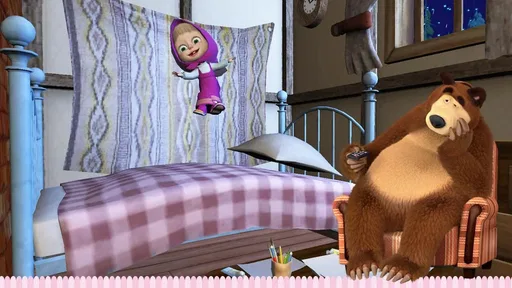
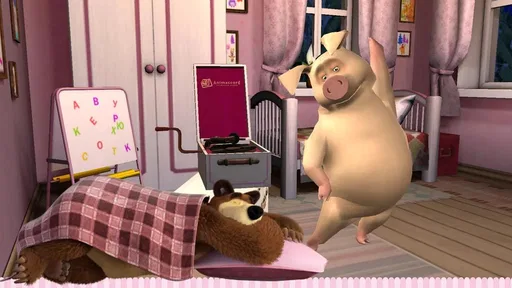
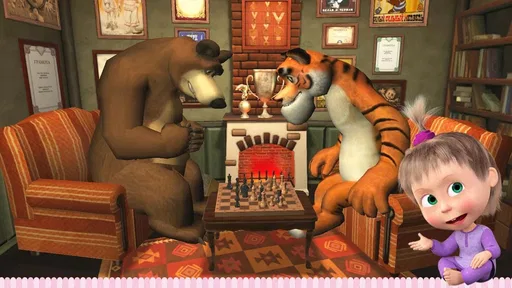
Our Review of Masha and the Bear: Good Night
 Analysis by Appyee
Bedtime can become surprisingly complicated when a child is tired but still wants one more story, one more game, or one more reason to stay awake. I tried Masha and the Bear: Good Night as a short, character-led bedtime activity, and its biggest strength is that it feels gentler than a typical mobile game. It is built around saying good night to familiar cartoon characters rather than chasing a score or competing against anyone.
That makes it an interesting choice for households that share a phone or tablet with a young child. I would not treat it as a complete bedtime routine, and I would not hand over the device without supervision simply because the content is child-friendly. Still, when used at the right moment, it can give a child a calm transition between active play and sleep.
A small bedtime activity that works best when shared
The game comes from DTC Lab and belongs to the educational side of mobile games. Its central idea is simple: children interact with cartoon heroes from Masha and the Bear while preparing them for the night. I found that simplicity useful. There is no complicated rulebook for a parent to explain, and a child who already knows the characters can understand the setting almost immediately.
In a shared-device home, the most natural use is not leaving the game open for long independent sessions. Instead, I would sit beside the child, let them choose what to do, and use the activity as a predictable final stop before putting the tablet away. That small change matters. The game becomes a shared ritual rather than another source of screen time that the child controls alone.
A realistic evening might look like this: after pajamas and brushing teeth, a child spends a few quiet minutes with the characters, then the adult announces that the heroes are going to sleep too. The device is put aside immediately afterward. The game cannot enforce that boundary for you, but its bedtime theme gives the parent a natural closing sentence, which is more useful than it may sound.
I also noticed that the game is better suited to one child and one adult than to a group. Two children may both want to take over the same screen, and the slow, soothing idea can quickly turn into an argument about whose turn it is. If siblings share a tablet, I would decide in advance whether they take turns, watch together, or use it on separate evenings. That kind of coordination has to happen outside the app.
What the child is actually doing
The experience is less like a traditional educational game with lessons, levels, and measurable progress, and more like a themed interactive bedtime scene. The recognizable characters provide the motivation. A child is encouraged to help the cartoon world settle down, rather than being asked to complete spelling exercises or solve increasingly difficult puzzles.
That distinction is important when comparing it with other children’s educational apps. If your goal is early mathematics, letter recognition, memory training, or a structured learning path, this is not the tool I would choose first. Its educational value is indirect: it supports a routine, invites gentle interaction, and gives children a familiar context for talking about rest and nighttime.
The lack of academic pressure is also part of its appeal. A tired child does not need to perform well, beat a timer, or understand a complicated reward system. For younger users, that can make the experience easier to manage than a stimulating game designed around constant achievement.
Setting boundaries before handing over the device
Because this is a free game, it is tempting to install it and let a child explore without much preparation. I would not do that. The listing includes in-app purchases ranging from about two dollars to about fifty dollars per item, so an adult should handle the store account and purchase settings before the child uses the game.
This is especially important on a shared phone or family tablet. The safest household workflow is to install and inspect the game yourself, check how the device handles purchases, and only then create a simple rule about who may tap the screen. I would also avoid giving a child access to the device’s wider app store during bedtime. The calmest game in the world cannot compensate for a sudden jump into unrelated downloads or notifications.
The free entry point makes trying it easy, but free does not mean completely frictionless. In-app purchase options can be a distraction for children who are curious about every button. I would explain clearly that tapping something is not the same as choosing it, and that purchases belong to the adult. For very young children, keeping the device in the adult’s hands while the child points or taps selected areas is the more dependable approach.
There is another boundary worth setting: the game should have a defined ending. If the child can restart the activity repeatedly, the bedtime purpose may disappear. I found it more effective to agree on one short session before opening the app. When the session ends, the parent closes the device rather than negotiating after the child is already tired.
Coordinating bedtime across a busy household
One overlooked advantage of a familiar character game is that it can give different adults the same script. If one parent usually handles bedtime but a grandparent or babysitter takes over occasionally, the routine is easier to repeat when the activity has a clear theme. “The characters are going to bed now” is a simple cue that does not require a long explanation.
That does not make the game a family scheduling tool. It does not replace communication between adults, and it should not be treated as an automatic timer or a substitute for agreed household rules. The useful part is the shared language around it. Adults can decide together when it is allowed, how long it lasts, and what happens immediately afterward.
For a shared device, I would keep the arrangement especially simple. One adult opens the game, the child plays while supervised, and the adult closes it when the agreed moment arrives. If several children use the same tablet, write the turn order somewhere visible rather than trying to settle it during the final minutes before sleep. That prevents the bedtime activity from becoming a competition.
I would also avoid using it as a reward every night if the child begins to treat sleep as something that must be earned through screen time. It works better as an occasional or consistent routine element that has a clear beginning and end. In my experience, the value comes from predictability, not from making the activity feel like a prize.
Age context, trust, and adult involvement
The content rating is Everyone, which fits the gentle premise and makes it suitable for a broad family audience. Even so, an age label does not tell you whether the experience will suit every child. Some children become calmer with a quiet character activity; others become more alert as soon as a screen appears. I would judge the child’s reaction rather than assuming that a bedtime theme automatically produces sleepiness.
For preschool-age children, an adult may need to guide the interaction and explain what is happening. Older children may understand the basic activity on their own, but that does not mean they should have unrestricted access to the household device. Trust here is less about the game being dangerous and more about teaching sensible habits around purchases, shared equipment, and stopping when an adult says the session is over.
I would also pay attention to the child’s relationship with Masha and the Bear. Familiar characters can make a new activity feel safe and inviting, but they can also make the child more eager to continue. If the child becomes excited rather than settled, this is probably better used earlier in the evening, not as the final thing before lights out.
The game is available at no charge, which lowers the barrier for families who want to test it. It has reached more than ten million installs and holds a 4.5 average from roughly sixty-nine thousand ratings, so it is clearly not an obscure experiment. Those figures suggest broad interest, but they do not guarantee that its rhythm will match your child’s temperament. I would still try it during a normal evening rather than introducing it for the first time during a difficult bedtime.
How it compares with ordinary alternatives
Compared with a printed bedtime book, the game offers interaction and recognizable animated characters, but it also introduces a screen and the possibility of purchase-related interruptions. A book is easier to control physically: when the last page is finished, it is obvious that the activity is over. If your child struggles to stop using devices, reading may be the better choice even if the game is enjoyable.
Compared with open-ended video platforms, this app is much easier to keep within a single theme. A child is not being invited to browse an endless stream of unrelated content. That narrower focus is a genuine advantage in a shared household, where an adult wants to know what kind of activity is happening without turning bedtime into a long selection process.
Compared with structured learning games, it has less obvious academic purpose. I would not install it to build a study habit or track educational progress. Its role is closer to a gentle transition activity. Families looking for phonics, counting, drawing practice, or problem-solving challenges will find stronger alternatives in those specific categories.
Compared with a dedicated sleep or relaxation app, it has the advantage of familiar characters for children who already like the show, but it may be less suitable for adults seeking ambient sounds, breathing exercises, or a quiet audio-only routine. It is a child-focused character experience, not a general sleep system.
Practical details before installation
The game was released on January 5, 2018, and the current version is 1.7.9. It requires Android 8.0 or later. Those details matter in a household with an older spare phone or tablet, because compatibility should be checked before planning the game as part of a regular routine.
Since the game is free to start, I would test it on the actual device the child will use rather than assuming that the experience will be identical across the family’s phones and tablets. Screen size, speaker volume, and the location of the device during bedtime can all change how manageable it feels. A tablet placed across the room may encourage passive watching, while a phone held close can make the screen more absorbing.
I would also decide whether the child is allowed to use headphones. For a young child, I prefer keeping the sound audible to the supervising adult, both for coordination and for awareness of what is happening. If the game is used in a shared bedroom, low volume and a short session are more considerate than letting the device become the loudest part of the room.
One useful habit is to open the game before bringing the child into the routine. That avoids waiting through installation screens, updates, or account prompts when everyone is already tired. It also gives the adult a chance to confirm that the device is in the right app and that purchase controls are handled as intended.
Where the experience falls short
The biggest limitation is that the game’s calm concept depends heavily on how the child uses it. A child can turn almost any interactive activity into an excuse to continue, and this one is not immune. The bedtime setting helps with storytelling, but it does not guarantee a quiet ending.
Another limitation is its narrow purpose. If you want a game that grows with a child through multiple skill areas, this is unlikely to become a long-term educational platform. The character theme may remain attractive, but the experience is designed around a particular bedtime mood rather than broad learning coverage.
The free model also requires adult attention because of the available in-app purchases. I do not see that as a reason to reject the game, but it does make unsupervised use less appealing. On a family device used by several people, purchase boundaries should be established before installation, not after an accidental tap creates confusion.
Finally, children who do not know or care about Masha and the Bear may have little reason to stay interested. The characters are not just decoration; they are the main emotional invitation. If your child prefers dinosaurs, vehicles, animals, or non-fiction topics, another bedtime activity may connect more naturally.
My household verdict
I see this as a useful small tool for families who want a familiar, low-pressure interaction before sleep. It is free to try, rated for Everyone, and simple enough to share between an adult and a young child without a long tutorial. The developer, DTC Lab, has focused the experience on a clear situation rather than trying to turn it into a complete entertainment library.
My recommendation comes with boundaries. I would supervise the first sessions, keep purchase access under adult control, agree on the stopping point beforehand, and avoid presenting the game as a replacement for reading or a full bedtime routine. Those choices make the difference between a short calming activity and another screen-time negotiation.
The best reason to choose it is its role in a shared ritual, not its depth as a game. If your child already enjoys the characters and responds well to a short interactive good-night moment, it can fit neatly into a household routine. If screens tend to energize your child, or if you need measurable learning progress, a book, audio routine, or more structured educational game will probably serve you better.
For my own use, I would keep it available as an occasional bedtime companion rather than the only option. Used with a clear adult-led ending, it offers a friendly way to coordinate the final few minutes of the evening. Used without a plan, its cheerful character appeal and optional purchases can work against the calm atmosphere parents are trying to create.
Verdict
Strengths of Masha and the Bear: Good Night
- Gentle bedtime activities help children transition calmly toward sleep.
- Simple controls are suitable for preschoolers with limited reading skills.
- Familiar characters make the experience engaging for young fans.
- Short sessions work well as part of a nightly routine.
- Offline play is convenient when traveling or away from Wi-Fi.
Limitations of Masha and the Bear: Good Night
- Appeal may be limited for children unfamiliar with the cartoon.
- Some activities can feel repetitive after frequent use.
- Adult guidance may still be needed for younger children.
- Device screen time before bed may not suit every family.
- Compatibility and performance can vary across older devices.
Other Releases by DTC Lab
View All
Masha and the Bear Educational
Educational4.4
Similar Picks in This Category
View All
Little Panda Policeman
BabyBus4.0

Monster Trucks Game for Kids 2
Raz Games4.1

Little Panda's Chinese Recipes
BabyBus4.4

Little Panda's Restaurant
BabyBus4.4

Little Panda's Ice Cream Games
BabyBus4.3

Baby Panda Care
BabyBus3.8
Frequently Asked Questions
What is Masha and the Bear: Good Night?
Masha and the Bear: Good Night is a bedtime-focused children’s app based on the popular animated series. It combines familiar characters with calming scenes, gentle activities, short stories, music, and interactive elements designed to help young children relax before sleeping. The experience is aimed mainly at preschoolers and is more suitable for quiet evening use than fast-paced entertainment.
What can children do in Masha and the Bear: Good Night?
Children can explore bedtime-themed activities featuring Masha, the Bear, and other recognizable elements from the show. Depending on the available version and device, the app may include simple interactions, lullabies, stories, animations, and routines such as preparing for bed. The controls are generally designed for small children, with tapping and swiping rather than complicated instructions.
Is Masha and the Bear: Good Night suitable for toddlers and preschoolers?
The app is primarily intended for young children, especially toddlers and preschool-aged users who enjoy Masha and the Bear. Its colorful visuals and simple interactions are easy for children to understand, while the slower bedtime atmosphere makes it more appropriate for evening relaxation. Parents should still supervise younger children and check whether the content matches their child’s age and sleep routine.
Does the app require an internet connection or include in-app purchases?
Internet requirements and payment features can vary according to the version downloaded, the operating system, and the developer’s current distribution settings. Some content may work offline after installation, while additional features, advertisements, or downloadable items may require a connection. Before installing, parents should review the official store listing for current information about in-app purchases, ads, and permissions.
Is Masha and the Bear: Good Night safe for children to use?
The app is designed as child-friendly entertainment, but parents should review its privacy details, advertising policy, and purchase settings before handing over a device. It is wise to enable parental controls, disable unauthorized purchases, and supervise any links or external content. Because app features can change through updates, checking the latest Google Play or App Store information is recommended.
Play our best games!


